Every developer knows the feeling: a blinking cursor, a looming deadline, and a mountain of boilerplate code standing between an idea and a shipped feature. This friction is exactly why AI coding assistants have moved from novelty to necessity. In 2026, they are no longer just fancy autocomplete tools; they are collaborative partners that write functions, debug errors, explain unfamiliar code, and even architect entire modules. If you are trying to decide which tool deserves a permanent seat in your workflow, this guide breaks down the best options, how they work, and how to use them well.
Table of Contents
What Are AI Coding Assistants?
AI coding assistants are software tools powered by large language models (LLMs) that understand natural language and programming syntax at the same time. They live inside your code editor, terminal, or browser and predict what you are trying to build. Instead of memorizing every API signature or searching forums for a fix, you describe your intent in plain English and the assistant generates working code.
These tools are trained on billions of lines of public code, documentation, and technical discussions. That training lets them recognize patterns, suggest idiomatic solutions, and adapt to the language you are using, whether that is Python, JavaScript, Rust, Go, or SQL. The most advanced systems in 2026 combine code completion with agentic behavior, meaning they can plan multi-step tasks, run commands, read your repository, and iterate on their own output.
Think of a modern AI programming tool as a tireless pair programmer. It never gets bored writing unit tests, it remembers the conventions of your codebase, and it can translate a legacy module from one framework to another in minutes. The goal is not to replace human judgment but to remove the repetitive work that slows engineers down.

Key Features of the Best AI Coding Assistants
Not every developer tool is created equal. When evaluating an intelligent code companion, these are the capabilities that separate the leaders from the rest.
Context-Aware Code Completion
The strongest AI coding assistants read the whole file, and often the entire project, before suggesting a line. This context awareness means the completion matches your variable names, imports, and coding style rather than offering generic snippets.
Natural Language Chat and Commands
A built-in chat panel lets you ask questions like “why is this function returning null?” or command the tool to “refactor this class to use dependency injection.” The assistant responds with explanations and editable code you can apply directly.
Agentic Task Execution
Agentic modes allow the tool to break a large request into steps, edit multiple files, run the terminal, and check the results. This is how features like “add authentication to my app” become a guided, end-to-end workflow instead of a single suggestion.
Automated Testing and Debugging
Top platforms generate unit tests, spot logical errors, and explain stack traces. Some can automatically reproduce a bug, propose a fix, and confirm the patch works before you review it.
Multi-Language and Framework Support
Whether you are working in React, Django, .NET, or a niche embedded system, a capable machine learning code tool should support dozens of languages and popular frameworks with equal fluency.
Top AI Coding Assistants in 2026
While dozens of tools compete for attention, a handful consistently rise to the top in 2026. Each one has a distinct personality and a type of developer it serves best, so the goal here is not to crown a single winner but to help you recognize which one fits your workflow. Every option below was chosen for genuine capability rather than marketing polish.
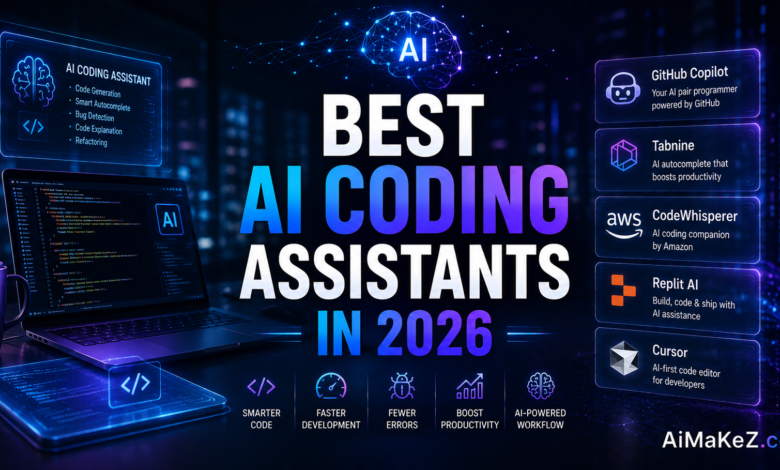
GitHub Copilot remains the default choice for many teams thanks to its deep integration with popular editors and its balance of speed and reliability. Its inline completions are fast and unobtrusive, its chat handles everyday questions well, and its tight fit with the wider GitHub ecosystem makes it an easy sell inside organizations already living on pull requests and Actions.
Cursor has become the favorite among developers who want an AI-native editor rather than a plugin. Built as a fork of a familiar editor, it puts the model at the center of the experience, excelling at multi-file edits and codebase-wide questions. It rewards people who are comfortable handing larger chunks of work to the assistant and reviewing the result.
Claude Code appeals to developers who prefer working from the terminal and value careful, well-reasoned changes across a project. It shines at understanding an existing codebase, planning multi-step tasks, and explaining its work clearly, which makes it a strong fit for refactoring and maintenance rather than quick throwaway scripts.
Rounding out the field, tools like Amazon Q Developer and JetBrains AI are worth watching for teams already invested in those ecosystems, offering strong language support and enterprise-friendly controls. The healthy competition among all of these AI coding assistants ultimately benefits developers, keeping prices reasonable and pushing every product to keep improving.
Before committing to any one platform, take advantage of the free tiers most of these AI coding assistants offer. Spend a few days running each candidate against a real slice of your own work rather than a toy example, and pay attention to how well it understands your conventions, how often you accept its suggestions, and how easily it fits into the editor and workflow you already enjoy. The best tool on paper is not always the best tool for your particular codebase, and a short, honest trial will tell you far more than any feature comparison chart.
Benefits of Using AI Coding Assistants
The practical advantages of adopting a developer AI tool go far beyond typing speed. They reshape how teams plan, build, and maintain software.
Faster development cycles. By handling boilerplate, configuration, and repetitive patterns, these tools free engineers to focus on architecture and problem solving. Many teams report shipping features noticeably faster after adopting an intelligent coding companion.
Lower barrier to entry. Junior developers and career switchers learn faster because the assistant explains code line by line and suggests best practices in real time. It acts like a mentor who is always available.
Fewer context switches. Instead of leaving the editor to search documentation, developers get answers inline. This keeps concentration intact and reduces the mental cost of jumping between tabs.
Higher code quality. Automated review, test generation, and security scanning catch issues before they reach production. Consistent style suggestions also make codebases easier to maintain across large teams.
Reduced burnout. Offloading tedious work makes the job more enjoyable. Engineers spend more time on creative challenges and less on repetitive grind, which improves long-term retention.
How AI Coding Assistants Work
Understanding the mechanics helps you use these tools more effectively. Here is a step-by-step look at what happens under the hood.
- Context gathering. The assistant reads your open file, related files, imports, and sometimes your entire repository to understand the surrounding logic.
- Prompt construction. Your typed code or chat message is combined with that context into a structured prompt sent to the underlying language model.
- Model inference. The LLM predicts the most likely and useful continuation, whether that is a completed function, a bug fix, or an explanation.
- Suggestion delivery. The result appears as an inline ghost-text suggestion, a chat reply, or a proposed multi-file edit you can preview.
- Human review and iteration. You accept, reject, or refine the output. In agentic mode, the tool may run tests and loop back to improve the result automatically.
The magic is in the feedback loop. The more precise your prompts and the cleaner your codebase, the better the suggestions become. Modern assistants also learn project-specific conventions during a session, so their accuracy improves the longer you work with them. For a deeper look at how these models are trained, the overview of large language models is a helpful primer.
Real-World Use Cases
The versatility of AI programming tools shows up across many industries and roles. Here are practical examples drawn from everyday work.
Business and Startups
A two-person startup can prototype a minimum viable product in days rather than weeks. Founders describe the feature, the assistant scaffolds the frontend and backend, and the small team validates the idea with real users before investing heavily.
Marketing and Content Creation
Marketing engineers use these tools to build landing-page A/B tests, tracking scripts, and data dashboards quickly. Content teams generate custom automation that pulls analytics into reports without waiting on a dedicated developer.
Education
Coding bootcamps and universities integrate AI assistants so students receive instant feedback on assignments. Learners can ask why an approach failed and see a corrected version with an explanation, accelerating the learning curve dramatically.
Productivity and Automation
Operations teams write scripts to automate spreadsheets, schedule reports, and connect APIs without deep programming experience. A non-engineer can describe a workflow and receive a runnable Python or JavaScript script in seconds.
Enterprise Engineering
Large organizations use AI coding assistants to modernize legacy systems. The tool reads decades-old code, documents it, and helps migrate it to modern frameworks, reducing a project that once took months to a matter of weeks.
Pros and Cons
| Pros | Cons |
|---|---|
| Dramatically faster coding and prototyping | Can produce confident but incorrect code |
| Inline explanations improve learning | Risk of over-reliance on suggestions |
| Automated tests and debugging | Privacy concerns with proprietary code |
| Supports many languages and frameworks | Subscription costs add up for teams |
| Reduces repetitive, tedious work | Quality depends on prompt clarity |
Pricing Overview
Most leading tools follow a freemium model with tiers aimed at individuals, teams, and enterprises. While exact prices shift over time, the general structure in 2026 looks like this.
Free plans typically offer limited completions, a capped number of chat messages, and access to smaller models. They are ideal for students and hobbyists testing the waters.
Individual pro plans usually range from roughly ten to twenty US dollars per month. These unlock unlimited completions, faster premium models, and agentic features suitable for full-time developers.
Team and enterprise plans add centralized billing, security controls, self-hosting options, and administrative dashboards. Pricing is often quoted per seat, with volume discounts for larger organizations.
When budgeting, weigh the subscription cost against the hours saved. For most professional developers, the productivity gain easily justifies a paid tier.
Comparison With Alternatives
The market for AI coding assistants in 2026 is crowded, so it helps to understand how the major categories differ. Independent developer surveys such as the annual Stack Overflow Developer Survey consistently show rising adoption across every experience level.
Editor-integrated copilots plug directly into popular IDEs and shine at real-time completion. They are the best entry point for developers who want speed without changing their environment.
AI-native editors rebuild the coding environment around the assistant. They excel at large, multi-file changes and agentic workflows because the entire interface is designed for AI collaboration.
Chat-based general models are flexible and great for explaining concepts, but they lack deep repository awareness unless paired with a dedicated integration. They work well as a second opinion rather than a primary coding surface.
Command-line agents live in the terminal and handle automation, scripting, and DevOps tasks. They suit engineers who prefer keyboard-driven, script-heavy workflows.
The right choice depends on your workflow. Many professionals combine two tools, using an editor copilot for daily coding and a chat model for research and planning. If you are new to the space, our guide to the best AI tools is a useful next step.
Best Practices for Using AI Coding Assistants
Getting the most out of these tools takes a little discipline. These expert recommendations will help you code smarter, not just faster.
- Write clear, specific prompts. Describe the goal, constraints, and expected inputs and outputs. Vague requests produce vague code.
- Always review generated code. Treat suggestions as drafts. Read them carefully, test them, and never merge code you do not understand.
- Provide context. Keep relevant files open and reference them so the assistant understands your architecture and conventions.
- Break big tasks into steps. Ask for one feature at a time. Incremental requests are easier to verify and correct.
- Use it to learn, not just to ship. Ask the assistant to explain its reasoning so you grow as an engineer instead of becoming dependent.
- Protect sensitive data. Check your organization’s policy before sending proprietary or regulated code to a cloud model.
Common Mistakes to Avoid
Even experienced developers stumble when they first adopt an AI programming tool. Avoid these pitfalls to protect your codebase and your growth.
- Blindly trusting output. AI can hallucinate functions or APIs that do not exist. Verify everything before shipping.
- Skipping tests. Generated code still needs the same testing rigor as human-written code. Never assume correctness.
- Ignoring security. Suggestions may include outdated or insecure patterns. Run security checks and dependency scans regularly.
- Over-prompting. Dumping an entire vague problem into chat often yields messy results. Precise, scoped requests work far better.
- Letting skills atrophy. Relying on the assistant for everything can erode your fundamentals. Keep practicing core problem solving on your own.
- Neglecting licensing. Be mindful of code provenance and your company’s compliance requirements when accepting large generated blocks.
Frequently Asked Questions
Are AI coding assistants safe to use with proprietary code?
It depends on the provider and plan. Enterprise tiers often include privacy guarantees, self-hosting, and options to exclude your code from training. Always review the data policy and follow your organization’s security guidelines before sharing sensitive code.
Will AI coding assistants replace software developers?
No. They automate repetitive work and boost productivity, but human judgment, system design, and creative problem solving remain essential. The role of the developer is evolving toward higher-level thinking rather than disappearing.
Which programming languages do these tools support?
The leading assistants support dozens of languages, including Python, JavaScript, TypeScript, Java, C#, Go, Rust, PHP, and SQL. Support is strongest for popular languages with abundant public code, though niche languages are increasingly well covered.
Do I need coding experience to use an AI coding assistant?
Basic programming knowledge helps you evaluate and correct suggestions, but beginners benefit enormously from the inline explanations. Many people learn to code faster by pairing hands-on practice with an assistant that explains each step.
How do I choose the best AI coding assistant for my needs?
Consider your primary language, your preferred editor, your budget, and whether you need agentic multi-file editing. Try the free tiers of two or three tools on a real project, then commit to the one that fits your workflow most naturally.
The Future of AI Coding Assistants
The tools available today are impressive, but they are still early in their evolution. Several trends are already reshaping what AI coding assistants can do, and understanding them helps you pick a tool that will still feel current a year from now rather than one you outgrow in months.
The clearest shift is toward deeper agentic autonomy. Instead of completing a single function, the next generation of assistants can take a plain-language ticket, plan the work, edit multiple files, run the test suite, and open a pull request with a written summary of what changed. Human review stays essential, but the assistant increasingly handles the mechanical middle of a task rather than just the first line of code.
A second trend is richer project awareness. Newer models hold far more of your codebase in context at once, so their suggestions respect your existing architecture, naming conventions, and internal libraries instead of proposing generic snippets. This makes their output feel less like autocomplete and more like advice from a teammate who has actually read your repository.
Finally, expect security and governance to move to the center of the conversation. As more organizations adopt these tools, vendors are investing in features like on-premise deployment, audit logs, license-aware suggestions, and guardrails that flag risky patterns before they ship. The practical takeaway is to favor tools with a healthy roadmap and transparent data practices, because the assistants that thrive will be the ones teams can trust with their most sensitive code.
Final Verdict
The best AI coding assistants in 2026 have earned their place as core parts of the modern development toolkit. They compress hours of tedious work into minutes, help newcomers learn faster, and let experienced engineers focus on the creative, high-value parts of building software. The technology is powerful, but it rewards thoughtful use rather than blind trust.
If you are just getting started, pick an editor-integrated copilot for real-time speed and pair it with a chat model for planning and learning. Teams tackling large refactors should lean toward AI-native editors with strong agentic features. Whatever you choose, remember that AI coding assistants amplify your ability rather than replace your judgment. Write clear prompts, review every suggestion, keep your fundamentals sharp, and you will get the full benefit of these AI coding assistants without the common downsides. Adopt one today, integrate it into your daily workflow, and you will quickly wonder how you ever shipped software without it.