Choosing the right AI assistant in 2026 feels harder than ever, and if you have landed here searching for a clear Claude vs Gemini breakdown, you are not alone. Millions of professionals, students, marketers, and developers across the United States and Europe are trying to decide which large language model deserves a permanent spot in their daily workflow. Both tools are brilliant, both are backed by tech giants, and both promise to save you hours every week. Yet they behave very differently once you push them on real tasks. This Claude vs Gemini guide cuts through the marketing noise and gives you an honest, experience-based comparison so you can pick the assistant that actually fits your needs.
Table of Contents
What Is Claude vs Gemini?
The phrase “Claude vs Gemini” refers to the ongoing comparison between two of the most capable AI assistants available today: Claude, developed by Anthropic, and Gemini, developed by Google DeepMind. Both are large language models (LLMs) that can understand natural language, reason through complex problems, generate text, analyze documents, write code, and increasingly work with images, audio, and video. When people compare Claude vs Gemini, they are really asking a practical question: which of these AI chatbots will help me think faster, write better, and get more done?
Claude is known for its thoughtful, nuanced writing, strong safety alignment, and a conversational tone that feels remarkably human. Anthropic built the model around a framework called Constitutional AI, which shapes how the assistant reasons about helpful and responsible answers. Gemini, on the other hand, is Google’s flagship multimodal model, deeply integrated across Search, Android, Chrome, and the Google Workspace suite that includes Gmail, Docs, and Sheets.
In short, both are generative AI tools competing for the same audience, but they approach the problem from opposite ends. Claude leans into depth, reasoning quality, and natural writing. Gemini leans into ecosystem reach, real-time information, and multimodal versatility. Understanding that difference is the key to winning the Claude vs Gemini decision for your own use case. If you want a broader view, our AI tools hub covers many related assistants in detail.
Key Features of Claude vs Gemini
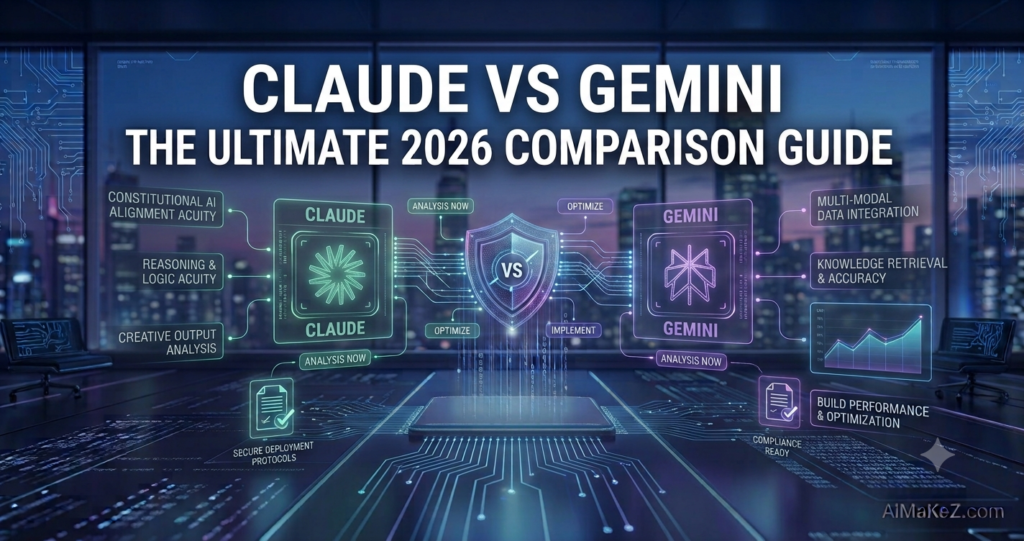
Before you commit to either platform, it helps to see exactly what each one brings to the table. Below is a feature-by-feature look at the strengths that define these two AI assistants in 2026.
Claude’s Standout Features
Claude is celebrated for its enormous context window, which lets it read and remember extremely long documents in a single conversation. You can drop an entire contract, research paper, or codebase into the chat and ask detailed questions without losing the thread. Its writing quality is a genuine differentiator; the prose reads naturally, avoids robotic phrasing, and adapts to the tone you request. Claude also excels at nuanced reasoning, following multi-step instructions, and admitting uncertainty rather than inventing facts. The Artifacts feature lets you generate and preview code, documents, and simple apps in a side panel, while Projects help you keep related conversations and files organized.
Gemini’s Standout Features
Gemini’s biggest advantage is native multimodality. It was trained from the ground up to handle text, images, audio, and video together, so you can show it a photo, a chart, or a clip and have it reason across all of them. Because Gemini connects to Google Search, it delivers up-to-date information and reliable citations for current events. Deep integration with Google Workspace means it can draft emails in Gmail, summarize threads, build formulas in Sheets, and generate slides in Google Slides without leaving the app. Gemini also powers features on Android and Pixel devices, and its live voice mode makes hands-free interaction smooth and responsive.
Benefits
The practical benefits of the Claude vs Gemini matchup go far beyond novelty. For knowledge workers, both assistants dramatically reduce the time spent on repetitive writing, research, and analysis. A marketer can outline a campaign in minutes, a developer can debug faster, and a student can turn a dense textbook chapter into clear study notes.
Claude’s benefit is clarity and trust. Because it writes so naturally and reasons carefully, the output usually needs less editing before it is ready to publish or send. That saved editing time adds up quickly for content creators and professionals who care about tone. Gemini’s benefit is reach and immediacy. Since it lives inside the Google ecosystem and taps live search, it removes friction; you get answers, drafts, and data summaries right where you already work, backed by current information.
Together these benefits mean less busywork, faster decisions, and more mental energy for the creative and strategic parts of your job that machines still cannot replace. Whichever side of the Claude vs Gemini debate you land on, that reclaimed time is the real prize. There is also a compounding effect over time: as you learn how each assistant thinks, you write sharper prompts, get better first drafts, and spend even less time correcting output. Teams that adopt these tools thoughtfully often report that the biggest gain is not raw speed but reduced friction, because tedious tasks that once caused procrastination now take only a few minutes to start and finish.
How the Claude vs Gemini Workflow Works
Getting value from either assistant follows a similar rhythm. Here is a simple step-by-step view of how you actually use them day to day.
- Create an account. Sign up at claude.ai for Claude or gemini.google.com for Gemini using an email or Google account.
- Pick your task. Decide whether you need writing, coding, research, data analysis, or brainstorming help.
- Write a clear prompt. Describe what you want, who it is for, the tone, and the format. The more context you give, the better the result.
- Add supporting material. Upload documents, paste text, or attach images so the AI understands your source material.
- Review and refine. Read the response, then ask follow-up questions or request edits to sharpen the output.
- Export and use. Copy the final text, download an artifact, or send it straight into your workflow — the same simple loop works whether you land on either side of the Claude vs Gemini choice.
Under the hood, both models predict language based on patterns learned during training, then apply reasoning and safety layers to shape responses. You do not need to understand the math to benefit from it; in the Claude vs Gemini workflow you simply need to communicate clearly and iterate.
Real-World Use Cases
Theory is nice, but the real test of any AI assistant is how it performs on everyday work. The Claude vs Gemini comparison becomes far clearer once you see each tool applied to real jobs. Here are practical examples across the fields where these tools shine.
Business and Productivity
A small business owner can use Gemini inside Google Workspace to summarize a long email thread, draft a reply, and update a budget spreadsheet in one sitting. Claude, meanwhile, is excellent for writing detailed proposals, meeting agendas, and executive summaries that require a polished, professional voice.
Marketing and Content Creation
Content teams lean on Claude for blog posts, ad copy, and email newsletters because of its natural, on-brand writing. Gemini adds value by pulling in fresh search data for topical articles and generating supporting visuals or reformatting content for different channels.
Education and Research
Students use Claude to break down complex topics into plain language and to get step-by-step explanations of tricky problems. Researchers appreciate its large context window for reading full papers. Gemini helps with literature lookups and current data thanks to its live web access.
Software Development and Automation
Developers use both models to write, review, and debug code. Claude’s Artifacts make it easy to preview a working snippet instantly, while Gemini integrates with Google’s developer tools and cloud services. For automation, both offer APIs that let teams build custom workflows, chatbots, and internal tools that scale.

Customer Support and Sales
Support teams use both assistants to draft empathetic replies, summarize long ticket histories, and turn dense knowledge-base articles into quick answers. Claude’s warm, natural tone is well suited to customer-facing messages that need to sound human, while Gemini can pull live product or policy details when an answer depends on the latest information. Sales teams, meanwhile, lean on these tools to personalize outreach, prepare call notes, and rewrite proposals for different audiences in seconds.
Pros and Cons: Claude vs Gemini
No AI assistant is perfect. In the Claude vs Gemini comparison, the table below summarizes the trade-offs so you can weigh them at a glance.
| AI Assistant | Pros | Cons |
|---|---|---|
| Claude | Superb natural writing; large context window; strong reasoning; safety-focused; clean interface | No native image generation; web access more limited; smaller app ecosystem |
| Gemini | Native multimodality; live Google Search data; deep Workspace integration; strong on Android | Writing can feel generic; occasional over-summarizing; privacy concerns for some users |
Performance and Benchmarks
Benchmarks only tell part of the story, but they are a useful starting point when you weigh performance. On reasoning-heavy evaluations, Claude tends to score highly for accuracy, careful step-by-step logic, and following long, detailed instructions without drifting off task. Gemini shines on tasks that blend text with images, charts, or video, and on questions that depend on fresh, real-time knowledge pulled from the web. In practical terms, that means Claude often feels more dependable for structured analysis, legal or technical writing, and code review, while Gemini feels faster for quick lookups, visual reasoning, and anything that touches current events.
Speed matters too. Both assistants respond quickly for short prompts, yet response time can vary with load and the length of your request. For very long documents, Claude’s generous context window means fewer interruptions, because you rarely need to split a file into chunks. For everyday questions, Gemini’s tight link to Google Search can shave seconds off research that would otherwise require opening several browser tabs. The honest takeaway is that neither model is universally faster; the winner depends on the specific job in front of you.
Pricing
Both companies offer a free tier that is genuinely useful for casual users, plus paid plans that unlock the most capable models and higher usage limits. Claude offers a free plan, a Pro subscription for individuals, and Team and Enterprise tiers for organizations, typically starting around 20 US dollars per month for Pro. Gemini follows a similar structure through the Google One AI Premium plan, also around 20 US dollars per month, which bundles the advanced Gemini model with extra cloud storage and Workspace features.
Pricing changes often, so always confirm the current rates on the official Anthropic and Google websites before subscribing. For most individuals, the free tiers are enough to test the Claude vs Gemini experience thoroughly before paying a cent.
Comparison With Alternatives
Claude and Gemini are not the only players. The most obvious alternative is OpenAI’s ChatGPT, which remains the most widely recognized AI chatbot and offers a balanced mix of writing, reasoning, and image generation. Compared with ChatGPT, Claude often edges ahead on long-form writing quality, while Gemini wins on real-time search and Google integration.
Other alternatives include Microsoft Copilot, which embeds AI across Microsoft 365, and Perplexity, which focuses on search-style answers with citations. For open-source enthusiasts, models like Llama and Mistral offer self-hosted flexibility. Still, for everyday users who want a polished, ready-to-use assistant, the Claude vs Gemini decision usually comes down to writing depth versus ecosystem breadth.
Integrations and Ecosystem
Where an AI assistant lives matters as much as how smart it is. Gemini has a clear structural advantage here because it is woven directly into products people already open every day. You can summarize a thread inside Gmail, rewrite a paragraph in Google Docs, clean up data in Sheets, or ask a question straight from Android without switching apps. That native placement removes friction and makes the tool feel less like a separate destination and more like a helpful layer over your existing work.
Claude takes a more open, platform-agnostic route. Rather than tying you to one company’s suite, it offers a clean web app, mobile apps, browser extensions, and a well-documented API that developers plug into their own tools, Slack channels, and internal dashboards. For teams that use a mix of software from different vendors, this flexibility is genuinely valuable. So the Claude vs Gemini choice on integrations often comes down to a simple question: do you want an assistant that lives inside Google, or one that plugs into everything else you already run?
Both also support connectors and third-party plugins that expand what they can do, from pulling live data to triggering actions in other services. If your business relies heavily on automation platforms like Zapier or Make, check which connectors each assistant supports before committing, because that single detail can decide how much time you actually save.
Best Practices
To win the Claude vs Gemini contest for your own needs, treat either assistant like a skilled collaborator rather than a magic button. Give it rich context, including your goal, audience, and preferred tone. Break large tasks into smaller steps and iterate on the output instead of expecting perfection on the first try.
Always fact-check important claims, especially statistics, dates, and quotes, because both models can occasionally make mistakes. Use Claude when the quality of writing and reasoning matters most, and reach for Gemini when you need current information or want to stay inside the Google ecosystem. Finally, save your best prompts so you can reuse them; a strong prompt library is the single biggest productivity multiplier with any AI tool.

Common Mistakes to Avoid
The most common mistake is writing vague prompts and then blaming the tool for vague answers. Another is trusting AI output blindly without verification, which can lead to embarrassing errors in published work. Many users also pick a tool based on hype rather than their actual workflow; if you live in Gmail and Docs, Gemini may simply fit better, while a professional writer may prefer Claude.
When you approach the Claude vs Gemini choice, avoid pasting sensitive personal, financial, or confidential company data into any consumer AI chat. Do not expect the free tier to match the paid model’s depth. And resist the urge to accept the first draft; the real value comes from refining and directing the AI toward exactly what you need.
Frequently Asked Questions
Which is better for writing, Claude or Gemini?
For long-form and creative writing, most users find Claude produces more natural, polished prose that needs less editing. Gemini writes well too, but its strength lies in pulling live information and working inside Google apps.
Is Gemini better than Claude for research?
Gemini has an edge for current-events research because it connects directly to Google Search and provides fresh citations. Claude is better for deep analysis of long documents you provide yourself thanks to its large context window.
Are Claude and Gemini free to use?
Yes, both offer capable free tiers. Paid plans, usually around 20 US dollars per month, unlock the most advanced models, higher limits, and extra features. Check the official sites for current pricing.
Which AI is safer for privacy?
Anthropic emphasizes safety and does not train on your conversations by default on paid tiers, while Google offers privacy controls within your account settings. Regardless of the tool, avoid sharing sensitive personal or confidential data.
Can I use both Claude and Gemini together?
Absolutely. Many power users pair them, drafting polished content in Claude and using Gemini for live research and Google Workspace tasks. Using both often delivers the best overall results.
Which Should You Choose?
If you are still on the fence, use this quick decision guide. Choose Claude when your work centers on writing, editing, reasoning, or analyzing long documents, and when a natural, trustworthy voice is worth more to you than built-in web search. Writers, consultants, lawyers, researchers, and developers who value careful output tend to feel most at home here. Choose Gemini when you live inside Google apps, need current information from the web, or want an assistant that understands images and video as easily as text. Marketers, analysts, students, and anyone glued to Gmail and Docs usually get more day-to-day value from it.
For teams, the calculation is slightly different. Consider your existing software stack, your budget, your data-privacy requirements, and how much your work depends on real-time information. Many organizations end up licensing both, assigning Claude to content and analysis roles and Gemini to research and productivity roles. That blended approach costs a little more, but it removes the biggest weakness of each tool and turns the Claude vs Gemini rivalry into a practical advantage rather than a hard choice.
Whatever you decide, remember that both platforms improve rapidly. The features and limits described here reflect the landscape in 2026, so revisit your choice every few months, because a gap that feels decisive today can close with the next model update.
Which Should You Choose?
If you are still stuck on the Claude vs Gemini decision, it helps to match each tool to a clear profile rather than chasing a single “best” answer. The right pick depends less on raw capability and more on how you actually spend your working hours.
Choose Claude If…
Pick Claude if writing quality is your top priority, if you regularly work with long documents that need careful analysis, or if you want an assistant that reasons transparently and rarely overstates its confidence. Writers, editors, researchers, lawyers, and developers who value clean, publish-ready output tend to feel most at home with Claude. Its calm, thoughtful tone also makes it a strong choice for sensitive, customer-facing communication where wording really matters.
Choose Gemini If…
Pick Gemini if you live inside Google’s ecosystem, if you need current information backed by live search, or if your work regularly mixes text with images, charts, and video. Marketers tracking trends, students doing quick research, and mobile-first users on Android will appreciate how naturally Gemini fits into their day. For many teams, the deciding factor is simply that Gemini is already one click away inside the apps they use.
Final Verdict on Claude vs Gemini
So, in the battle of Claude vs Gemini, which one wins? The honest answer is that it depends entirely on what you value most. If your priority is writing quality, careful reasoning, and a natural, trustworthy voice, Claude is the stronger choice and often feels like collaborating with a thoughtful expert. If you need real-time information, multimodal understanding, and seamless integration across Gmail, Docs, and Android, Gemini is hard to beat.
For most readers in the United States and Europe, the smartest move is to test both free tiers on your own real tasks for a week. You will quickly feel which assistant matches your workflow, and the Claude vs Gemini verdict will basically make itself. And if budget allows, running both in parallel gives you the best of depth and breadth, turning the Claude vs Gemini debate from an either-or decision into a powerful two-tool productivity stack for 2026 and beyond.